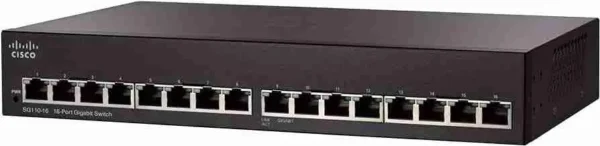
Cisco SG110-16 Unmanaged Switch
- 16 Gigabit Ethernet Ports – Provides high-speed 10/100/1000 Mbps connectivity for computers, printers, IP phones, NAS devices, and other network equipment.
- Plug-and-Play Operation – No software installation or configuration required; simply connect devices and the switch starts working immediately.
- Auto Speed Detection – Automatically detects the optimal network speed (10/100/1000 Mbps) for each connected device.
- Auto MDI/MDIX Support – Eliminates the need for crossover cables by automatically detecting cable types.
- Wire-Speed Performance – Delivers fast, non-blocking data forwarding for smooth file transfers, video streaming, and business applications.
- Quality of Service (QoS) – Prioritizes latency-sensitive traffic such as voice and video for improved network performance.
- Loop Detection – Helps identify network loops to prevent broadcast storms and maintain network stability.
- Cable Diagnostics – Assists in quickly identifying cable faults and connection issues for easier troubleshooting.
- Energy-Efficient Design – Supports Energy Efficient Ethernet (IEEE 802.3az) and intelligent power management to reduce energy consumption.
- Compact Rack-Mountable Design – Suitable for desktop placement or installation in a standard network rack, making it ideal for small businesses and branch offices.
KSh 15,000.00
This item: Cisco SG110-16 Unmanaged Switch
KSh 15,000.00
KSh 15,000.00


Guaranteed safe & secure checkout
Description
Cisco SG110-16 Unmanaged Switch
The Cisco SG110-16 is an unmanaged switch designed for small businesses and home offices. Unmanaged switches are straightforward networking devices that provide basic network connectivity without the need for complex configuration. Here’s a description of the Cisco SG110-16 Unmanaged Switch:
- Port Count: The SG110-16 switch features 16 Ethernet ports, all of which support Gigabit speeds (10/100/1000 Mbps). These ports can be used to connect various network devices, including computers, printers, IP cameras, and other networking equipment.
- Unmanaged: This switch is “unmanaged,” meaning it doesn’t require configuration or management through a web interface, command-line interface (CLI), or SNMP (Simple Network Management Protocol). Unmanaged switches are typically “plug-and-play” devices, making them easy to set up and use.
- Rack-Mountable: The switch is designed to be rack-mounted, allowing for efficient installation in network racks or cabinets. It can also be used on a desktop or shelf if needed.
- Auto-Negotiation: The SG110-16 supports auto-negotiation, which means it can automatically detect and configure the appropriate speed (10/100/1000 Mbps) and duplex (half or full) settings for connected devices. This feature simplifies network setup.
- Flow Control: The switch typically supports IEEE 802.3x flow control, which helps prevent packet loss and network congestion by managing data traffic during peak usage.
- Energy Efficient: Cisco often designs its switches to be energy efficient. The SG110-16 may include features like Energy-Efficient Ethernet (EEE) and automatic power-saving modes to reduce energy consumption when network ports are not in active use.
- Usage: This switch is suitable for small businesses, home offices, or any environment where basic network connectivity is required. It’s often used to expand the number of Ethernet ports available on a network or to provide Gigabit connectivity to devices that require it.
- Reliability: Cisco is a reputable networking equipment manufacturer known for producing reliable and high-quality networking products. The SG110-16 switch is designed to provide stable and dependable network connectivity.
- Fanless Design: Many small, unmanaged switches, including the SG110-16, feature a fanless design, which means they operate silently and are suitable for quiet office environments.
- Metal Casing: The switch’s metal casing provides durability and protection, making it suitable for use in various environments.
Before deploying the Cisco SG110-16 Unmanaged Switch, it’s essential to ensure that it meets your specific networking requirements. Unmanaged switches are best suited for simple network setups where basic connectivity is needed without advanced features or management capabilities. If your network requires advanced features like VLAN support, QoS settings, or security features, you may need to consider a managed switch instead.